


I’ve had a perfectly organized desk. I’ve also had a desk that looked like a stationery store exploded on it. I’ve done real work at both.
What I’ve learned over several years of working from home is that desk organization is less about aesthetics and more about reducing the micro-decisions and visual interruptions that accumulate throughout a workday. A cluttered desk doesn’t ruin your focus on its own. But every time your eye catches something that doesn’t belong, your brain takes a tiny detour. Those tiny detours add up.
The products in this guide are specifically selected for people who work at a desk regularly — whether that’s a home office, a shared workspace, or a corporate desk you spend 8 hours at daily. I’m not recommending things that look good in desk setup photos. I’m recommending things that solve specific, real organizational problems.
What Makes a Desk Product Actually Useful
The test I apply to every desk product before recommending it: does it reduce the number of times I have to think about where something is or where something goes?
If a desk organizer means you always know where your pens are without searching, it passed the test. If a cable management solution means you never have to detangle cords at the start of a workday, it passed. If a planner means your priorities are written down somewhere visible rather than competing for mental RAM, it passed.
The failure mode for most desk products is the opposite: they become another thing to maintain, tidy, and think about. A complex 12-compartment organizer system requires constant decisions about what goes where. A beautiful but impractical document holder becomes a flat surface to stack things on top of. Buy for simplicity of use, not visual complexity.

Who it’s actually for: Anyone who keeps basic stationery, chargers, sticky notes, and small items on their desk and currently has no designated place for any of them.
The SimpleHouseware Mesh Desk Organizer ($22–$28) is the utilitarian recommendation. Metal mesh construction, multiple compartments of different sizes, small footprint, and a design that prioritizes function over aesthetics. It holds what it’s supposed to hold, stays on the desk without sliding, and doesn’t require assembly or decision-making to use. At $22–$28, it’s completely expendable if your needs change.
For people who care about how their workspace looks, the Bamboo Desk Organizer from mDesign or BAMEOS ($30–$40) serves the same organizational function with significantly better aesthetics. The bamboo construction is more durable than plastic alternatives, looks intentional on a desk, and holds up to daily use without the corners cracking or the compartment dividers loosening over time.
The honest caveat: Don’t buy a desk organizer until you understand what you actually need to organize. Spend one week noting what you reach for most often and where things consistently end up scattered. Then buy based on what you observed, not on what a beautifully styled desk photo shows.
Price range: $22–$40 covers everything worth buying here. Above $60 for a desk organizer is aesthetics budget, not function budget.

Who it’s actually for: Anyone working with three or more plugged-in devices who looks under or behind their desk and feels mild despair.
Cable clutter is genuinely underrated as a source of workspace distraction and minor daily frustration. The tangled cable situation behind most desks is also a real dust trap and can create trip hazards. The fix doesn’t require expensive equipment.
The Bluelounge CableBox Mini ($30–$35) is a simple plastic box that your power strip and excess cable slack lives inside. The lid goes on top. The cables thread through openings on the sides. Your desk surface and floor area no longer have a pile of cables visible. That’s the entire product. It works because it’s simple and because out-of-sight genuinely means out-of-mind for most people.
JOTO Cable Management Sleeves ($10–$15 for a pack) are neoprene tubes that bundle cables running along a desk edge or down a wall. They’re not as tidy as a cable channel system but require no drilling or tools — just thread the cables through, zip it up, and the cable mess becomes a clean single sleeve.
The honest caveat: Cable management is one of those desk problems where the $10–$15 solution genuinely works as well as the $80 premium version for most people. Don’t overthink this one.
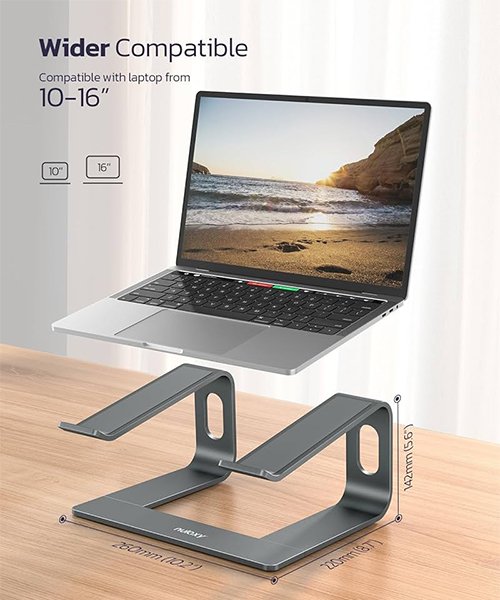
Who it’s actually for: Anyone who ends a workday with neck or upper back tightness, or anyone whose monitor is positioned below eye level.
This one is less “organizational product” and more “ergonomic intervention,” but it solves a real daily comfort problem that significantly affects work quality over time. Sitting with your monitor below eye level means your neck is bent forward throughout the day. Hours of that creates chronic tension and eventually pain.
The Vivo Single Monitor Stand ($25–$35) for desktop monitors is a simple riser that lifts the screen to a comfortable eye-level position and creates usable storage space underneath for a keyboard when not in use. Nothing technical about it — just properly raises the screen.
For laptop users, the Nulaxy Laptop Stand ($25–$30) or Rain Design mStand ($40–$45) create the same eye-level positioning while also improving airflow under the laptop (which reduces thermal throttling on prolonged use). You’ll need a separate keyboard and mouse for this setup, which adds cost, but the neck position improvement is genuinely worth it for anyone working 6+ hours daily.
The honest caveat: This is one of those products where the right response to “do I need this?” is: how’s your neck feeling? If the answer is “fine,” you probably don’t. If the answer involves any mention of tightness or soreness, you need this more than most things on this list.
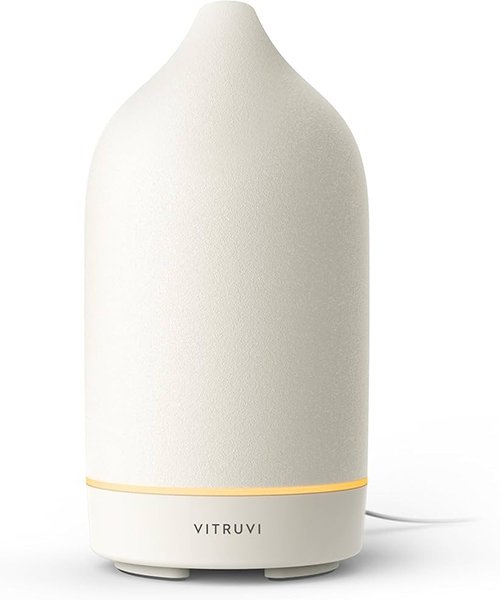
Who it’s actually for: People who spend significant time working at a desk and find that ambient scent genuinely affects their focus or mood, or anyone who uses aromatherapy as part of a wind-down or morning routine.
I want to be careful here because the wellness marketing around diffusers is extraordinarily overblown. A diffuser doesn’t boost your productivity by 40%. It doesn’t cure anxiety. It doesn’t do most of what influencer content suggests it does.
What it does do: creates a consistent ambient sensory environment in a workspace. Some people find this grounding and helpful for maintaining focus. Some people don’t notice it at all. It’s genuinely personal.
The InnoGear Ultrasonic Diffuser ($20–$25) is the no-fuss recommendation. Fill with water, add 5–8 drops of essential oil, press a button. It runs quietly, has a small footprint, auto-shuts off when water runs out, and the intermittent mist mode extends oil use. At $20–$25, it’s inexpensive enough to try without commitment.
The Vitruvi Stone Diffuser ($120–$130) is the premium option for people who care about the desk aesthetic and use the diffuser daily. The ceramic construction is genuinely beautiful, the mist output is better controlled than plastic ultrasonic options, and it’s quiet enough to use during video calls. But it’s $100+ more than the InnoGear for a functionally similar outcome.
The honest caveat: Try the $20–$25 ultrasonic diffuser for six weeks before deciding whether you want to upgrade. If you find yourself actually using it every day, the investment in a nicer one makes sense. If it sits on your desk unused after two weeks, you’ve lost $25, not $130.
Best oils for desk/work contexts: Peppermint (alertness), eucalyptus (clarity), bergamot (focus without stimulation), lavender (late afternoon wind-down). These aren’t magic but they’re pleasant and some people genuinely respond to them.
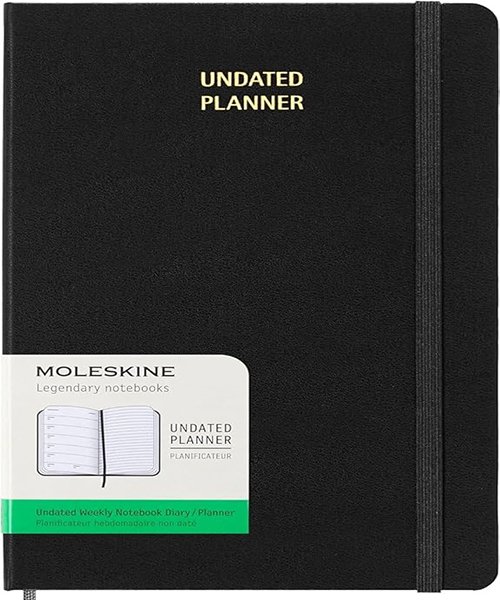
Who it’s actually for: Remote workers, freelancers, or anyone who manages their own schedule and needs a physical planning system that lives on their desk rather than in their bag.
A desk planner is different from a portable planner — it’s larger format, more visual, and acts as a daily anchor for the workday. The best ones create a visible structure for the day without requiring constant interaction.
The Appointed Weekly Planner ($30–$40) uses a clean two-page weekly spread with time blocks and note space. The paper is Mohawk Superfine — one of the better uncoated papers for writing — and the spiral binding lies completely flat when open. It sits on a desk and communicates the week at a glance. What’s on today. What’s coming. What’s overdue.
The Moleskine Weekly Notebook ($22–$28) combines a weekly calendar spread with blank notebook pages in the same volume. The calendar side manages scheduling, the notebook side captures everything else. For people who need a notebook alongside a planner, this is more space-efficient than carrying two separate books.
The honest caveat: A desk planner only improves your workday if you write in it at the start of each day and check it throughout. The format is less important than the 5-minute morning ritual of actually planning the day. Any planner works if used. The expensive ones just feel better in hand, which some people find motivating and others find irrelevant.
Budget vs. Premium Breakdown
Product | Budget Pick | Premium Pick | Honest Verdict |
Desk Organizer | SimpleHouseware Mesh $22 | Bamboo Organizer $35 | Budget works fine; premium just looks better |
Cable Management | JOTO Sleeves $12 | Bluelounge CableBox $32 | Both solve the problem; premium is tidier |
Monitor Stand | Vivo Basic $28 | Rain Design mStand $45 | Both work; spend more if you use it 8hrs/day |
Diffuser | InnoGear $22 | Vitruvi Stone $125 | Test with budget version first |
Desk Planner | Moleskine Weekly $24 | Appointed Weekly $38 | Paper quality improves the writing experience |
What Not to Buy
A cable management system before you know your setup is permanent. If you’re likely to rearrange your desk in the next three months, wait. Installed cable channels are annoying to remove and reinstall.
A large multi-section organizer before you’ve counted what you actually keep on your desk. Most people use 3–4 categories of desk items. Most organizers have 8–12 compartments. The unused sections collect clutter.
A diffuser if you share the space. Scent is intensely personal. What smells like “focus” to you might be headache-inducing to a partner or coworker. Confirm this won’t be an issue before adding something that affects the air quality of a shared room.
Final Recommendation
For a desk that genuinely supports focused work in 2026, the most impactful starting points are: a simple organizer that gives everything a home, cable management to eliminate visual clutter, and a monitor at the right height.
The planner and diffuser are meaningful additions if you use them consistently. They’re expensive desk decorations if you don’t.
Start with organization. Add sensory elements once the physical environment is sorted.